在電子商務中,靈活的定價策略對於吸引顧客和提高銷售非常重要。今天,我們將介紹一個在 WooCommerce 中實現的實用功能:買多享優惠,這個功能能夠自動根據購買數量調整價格,讓顧客在購買更多商品時享受更多優惠。
功能概述
“買多享優惠”功能允許商家為每個產品設置不同的數量折扣規則。當顧客在購物車中選擇了較多數量的商品後,系統會自動調整價格,讓顧客能夠獲得更低的單價優惠。
主要特點:
- 自動價格調整:根據顧客選擇的購買數量,自動應用設定好的優惠價格。
- 靈活的設定選項:商家可以在產品編輯頁面上啟用或禁用此功能,並設置不同數量的優惠價格。
- 前端展示清晰明瞭:在產品詳情頁的售價下方,顯示一個清晰的表格,列出不同數量對應的價格。
程式碼
// 在產品編輯頁面中添加自定義字段
function add_custom_price_options() {
    echo '<div class="options_group">';

    // 勾選框:啟用自定義價格功能
    woocommerce_wp_checkbox(
        array(
            'id'            => '_enable_custom_price',
            'label'         => __('Enable Custom Price', 'woocommerce'),
            'description'   => __('Enable custom pricing based on quantity.', 'woocommerce'),
        )
    );

    // 文本輸入:自定義價格選項
    woocommerce_wp_text_input(
        array(
            'id'          => '_custom_price_options',
            'label'       => __('Custom Price Options', 'woocommerce'),
            'placeholder' => 'e.g. 5:1500,6:1200,10:1000',
            'desc_tip'    => 'true',
            'description' => __('Enter different quantities and their respective prices.', 'woocommerce'),
        )
    );
    echo '</div>';
}
add_action('woocommerce_product_options_pricing', 'add_custom_price_options');

// 保存自定義字段數據
function save_custom_price_options($post_id) {
    $enable_custom_price = isset($_POST['_enable_custom_price']) ? 'yes' : 'no';
    $custom_price_options = isset($_POST['_custom_price_options']) ? sanitize_text_field($_POST['_custom_price_options']) : '';

    update_post_meta($post_id, '_enable_custom_price', $enable_custom_price);
    update_post_meta($post_id, '_custom_price_options', $custom_price_options);
}
add_action('woocommerce_process_product_meta', 'save_custom_price_options');

// 根據數量更新購物車中的價格
function update_cart_price_based_on_quantity($cart_object) {
    if (!WC()->session->__isset('reload_checkout')) {
        foreach ($cart_object->get_cart() as $cart_item_key => $cart_item) {
            $product_id = $cart_item['product_id'];
            $quantity = $cart_item['quantity'];
            $enable_custom_price = get_post_meta($product_id, '_enable_custom_price', true);
            $custom_price_options = get_post_meta($product_id, '_custom_price_options', true);

            if ($enable_custom_price === 'yes' && !empty($custom_price_options)) {
                $options = explode(',', $custom_price_options);
                foreach ($options as $option) {
                    list($qty, $price) = explode(':', $option);
                    if ($quantity >= $qty) {
                        $cart_item['data']->set_price((float) $price);
                    }
                }
            }
        }
    }
}
add_action('woocommerce_before_calculate_totals', 'update_cart_price_based_on_quantity');

// 在產品頁面顯示數量價格表格
function display_quantity_price_table() {
    global $product;
    $enable_custom_price = get_post_meta($product->get_id(), '_enable_custom_price', true);
    $custom_price_options = get_post_meta($product->get_id(), '_custom_price_options', true);

    if ($enable_custom_price === 'yes' && !empty($custom_price_options)) {
        $options = explode(',', $custom_price_options);

        echo '<div style="margin-top: 20px;">';
        echo '<h3 style="margin-bottom: 10px; text-align: center;">' . __('買多享優惠', 'woocommerce') . '</h3>';
        echo '<table class="quantity-price-table" style="width:100%; border-collapse: collapse; text-align: center;">';
        echo '<thead>';
        echo '<tr>';
        echo '<th style="border: 1px solid #ddd; padding: 8px; background-color: #f8f8f8;">' . __('Quantity', 'woocommerce') . '</th>';
        echo '<th style="border: 1px solid #ddd; padding: 8px; background-color: #f8f8f8;">' . __('Price', 'woocommerce') . '</th>';
        echo '</tr>';
        echo '</thead>';
        echo '<tbody>';

        foreach ($options as $option) {
            list($quantity, $price) = explode(':', $option);
            echo '<tr>';
            echo '<td style="border: 1px solid #ddd; padding: 8px; text-align: center;">' . esc_html($quantity) . '</td>';
            echo '<td style="border: 1px solid #ddd; padding: 8px; text-align: center;">' . wc_price($price) . '</td>';
            echo '</tr>';
        }

        echo '</tbody>';
        echo '</table>';
        echo '</div>';
    }
}
add_action('woocommerce_single_product_summary', 'display_quantity_price_table', 11);
如何使用這個功能
啟用自定義價格
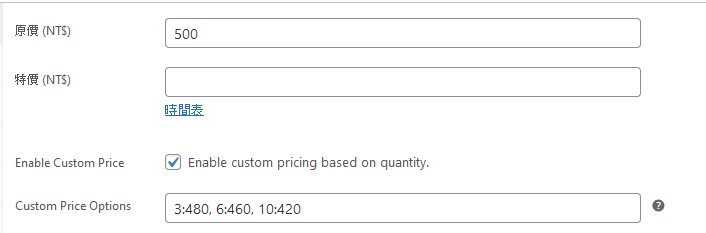
在 WooCommerce 的產品編輯頁面中,你會看到一個選項叫“Enable Custom Price”。勾選這個選項後,你可以在相應的文本框中設置不同數量的價格,例如:5:1500,6:1200,10:1000。這表示當購買數量達到或超過 5 件時,單價為 1500,以此類推。
顧客體驗
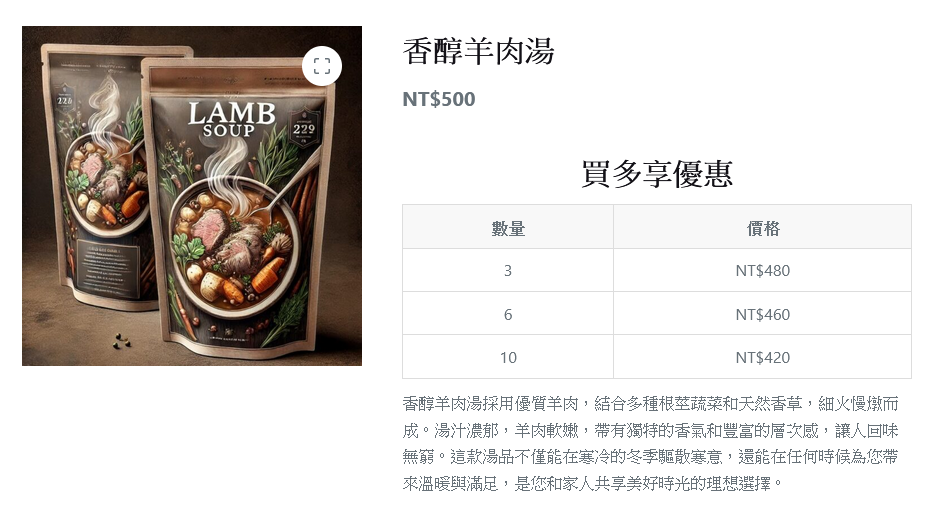
當顧客在網站上查看產品時,他們會在產品售價下方看到一個名為“買多享優惠”的表格。這個表格會清楚地展示不同數量的商品所對應的優惠價格,讓顧客在購物時更加明確地知道自己能夠享受的折扣。
優勢
- 促進銷售:通過鼓勵顧客購買更多數量來獲得更高的折扣,從而增加總銷售額。
- 提高客戶滿意度:提供透明的價格折扣信息,讓顧客感受到物有所值的購物體驗。
- 簡單易用:商家只需在產品後台勾選選項並設定優惠價格即可,無需複雜的操作。